No BS Web Hosting
  • 0 Shopping Cart
  • Home
  • Store
    • Browse All
    • Shared Hosting
    • Register a New Domain
    • Transfer Domains to Us
  • News
  • Knowledgebase
  • Contact Us
  • More
  • Account
    • Login
    • Register
    • Forgot Password?
  1. Portal Home
  2. Knowledgebase
  3. Databases
  4. How to Create a Database in cPanel

  Categories

Backup/Restore
4
CloudLinux (cPanel)
10
cPanel - Control Panel
24
Databases
11
DNS - Nameservers
6
Domain Management
10
Email
17
FTP
9
Mail Filters & SPAM
8
Mobile
11
Others
3
PayPal
7
Security
10
Softaculous
69
SSL
5
WHM
18
WordPress
17

  Categories

  Support

My Support Tickets
News
Knowledgebase
Downloads
Network Status
Open Ticket

How to Create a Database in cPanel Print

  • 0

1. Log in to your cPanel account.

2. In the Databases section, click on MySQL Databases.

mysql-databases-icon.gif

3. In the New Database field, enter a name for the new database you wish to create.
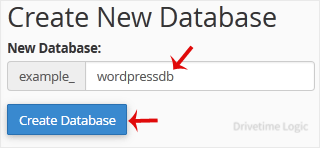

4. Click on Create Database.

paper-db-added-successfully.gif


Was this answer helpful?

Related Articles

How to Rename a Database in cPanel 1. Log in to your cPanel account. 2. In the Databases section, click on MySQL Databases. 3.... How to Delete a Database in cPanel 1. Log in to your cPanel account. 2. In the Databases section, click on MySQL Databases. 3.... How to Add a User to a Database and Grant Privileges 1. Log in to your cPanel account. 2. In the Databases section, click on MySQL Databases. 3.... How to Import a Database via phpMyAdmin in cPanel 1. Log in to your cPanel account.2. In the Databases section, click on phpMyAdmin.3. From the... How to Export Database Table via phpMyAdmin in cPanel 1. Log in to your cPanel account.2. In the Databases section, click on phpMyAdmin. 3. From the...
Back

  Support

My Support Tickets
News
Knowledgebase
Downloads
Network Status
Open Ticket
  • Contact Us

Copyright © 2026 No BS Web Hosting. All Rights Reserved.


Loading...
Loading...

Generate Password

Please enter a number between 8 and 64 for the password length